skip to main
|
skip to sidebar
Vanessa T. Digital World P9
Wednesday, May 13, 2009
Slide Sorter view
It is the view in which you see all the slides, in a miniature size, and can rearrange the order of the slides.
Slide Show view
It is what you see on your screen when presenting your slide show.
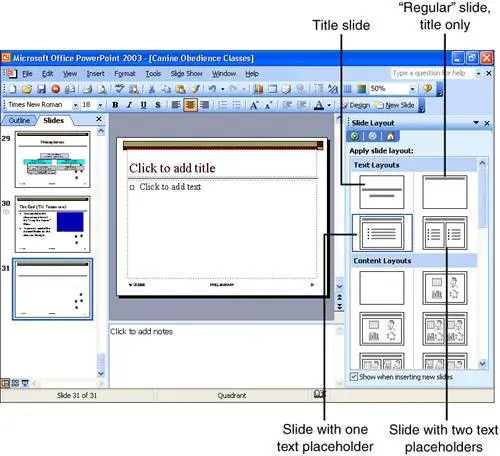
Slide layout
The types of layouts in which your slides' will look like (text, pictures, etc.)
Slide Finder
It helps you find slides that you frequently use or favorite slides.
Slide design
It is the designs that you can use on your slides.
Presentations
It is a group of slides on PowerPoint that will be presented in full screen in front of an audience.
Placeholders
It is the invisible box in which it holds the place where your going to write in or put a picture.
Normal view
It is the main view that you see on the screen.
Thursday, May 7, 2009
Print Layout view
It is the view that you would see when you are going to print out your work.
Normal view
It is the main view you see on your monitor that you use.
Word wrap
The feature in which you can adjust the lines of the text so that it can fit onto the page.
Default
In a group of the same hardware or software it is the main one to be used.
Web Layout view
It is when you get to view the layout of your work on a web page.
Toggle
A switch that has only two positions. These two positions represent the two setting choices.
Strikethrough
The graphic presentation in which it looks like a word is crossed out in a horizontal line in the center of the word.
Tuesday, May 5, 2009
Word art text
You can modify text without word art by highlighting and editing the text. You can change the font, size, and color of the text.
Monday, May 4, 2009
Comment
When you post or write what you want to say to someone on a piece of writing, art, etc.
Newer Posts
Older Posts
Home
Subscribe to:
Posts (Atom)
Followers
Blog Archive
▼
2009
(117)
►
June
(3)
▼
May
(17)
Slide Sorter view
Slide Show view
Slide layout
Slide Finder
Slide design
Presentations
Placeholders
Normal view
Print Layout view
Normal view
Word wrap
Default
Web Layout view
Toggle
Strikethrough
Word art text
Comment
►
April
(30)
►
March
(18)
►
February
(49)
About Me
Vanessa T.
View my complete profile