10 sys("command.com/c cls")
20 print "What grade are you in? If your a Freshman type 1. If your a Sophomore type 2. If your a Junior type 3. If your a Senior type 4."
30 input Num1
40 IF Num1 = 1 then goto 50
41 if Num1 > 4 then goto 112
42 IF Num1 = 2 then goto 70
43 if Num1 < 1 then goto 112
44 If Num1 = 3 then goto 90
46 If Num1 = 4 then goto 110
50 print "So your a Freshman. Haha!"
60 goto 120
70 print "So your a Sophomore. Cool!"
80 goto 120
90 print "So your a Junior. Awesome!"
100 goto 120
110 print "So your a Senior. Lucky!"
111 goto 120
112 print "Incorrect number please choose number between 1-4."
113 goto 30
120 end
Thursday, June 11, 2009

Assignment 3
10 sys("command.com/c cls")
20 print "What grade are you in? If your a Freshman type 1. If your a Sophomore type 2. If your a Junior type 3. If your a Senior type 4."
30 input Num1
40 IF Num1 = 1 then goto 50
42 IF Num1 = 2 then goto 70
44 If Num1 = 3 then goto 90
46 If Num1 = 4 then goto 110
50 print "So your a Freshman. haha!"
60 goto 120
70 print "So your a Sophomore. cool!"
80 goto 120
90 print "So your a Junior. awesome!"
100 goto 120
110 print "So your a Senior. Lucky!"
120 end
20 print "What grade are you in? If your a Freshman type 1. If your a Sophomore type 2. If your a Junior type 3. If your a Senior type 4."
30 input Num1
40 IF Num1 = 1 then goto 50
42 IF Num1 = 2 then goto 70
44 If Num1 = 3 then goto 90
46 If Num1 = 4 then goto 110
50 print "So your a Freshman. haha!"
60 goto 120
70 print "So your a Sophomore. cool!"
80 goto 120
90 print "So your a Junior. awesome!"
100 goto 120
110 print "So your a Senior. Lucky!"
120 end
Wednesday, June 10, 2009
Basic if
The if statement on basic states if the problem that you wrote is true or false. When you write a problem it will either say "the if statement is true" or it will say "the if statement if false".
It can be used as a calculator. It can be used in businesses that need to add up there money. It can also be used for kids that need to work that require if statements.
A working if statement- its a guessing the number if statement
Assignment 5
10 sys("command.com/c cls")
20 print "Guess a number between 1-10"
30 input Num1
40 IF num1 = 7 then goto 70
50 print "Sorry you got it wrong"
60 goto 20
70 print "Yay you got it right!!!"
80 end
It can be used as a calculator. It can be used in businesses that need to add up there money. It can also be used for kids that need to work that require if statements.
A working if statement- its a guessing the number if statement
Assignment 5
10 sys("command.com/c cls")
20 print "Guess a number between 1-10"
30 input Num1
40 IF num1 = 7 then goto 70
50 print "Sorry you got it wrong"
60 goto 20
70 print "Yay you got it right!!!"
80 end
Wednesday, May 13, 2009
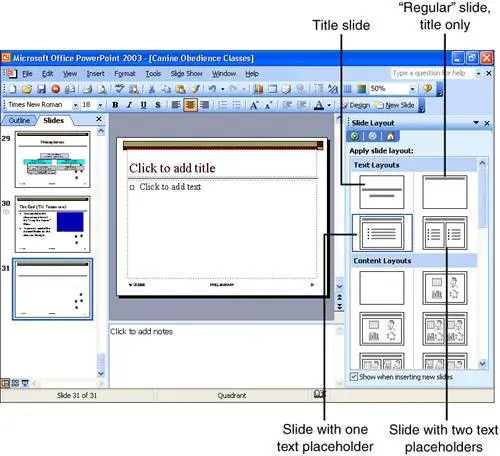
Slide Sorter view

It is the view in which you see all the slides, in a miniature size, and can rearrange the order of the slides.



Presentations

It is a group of slides on PowerPoint that will be presented in full screen in front of an audience.
Placeholders

It is the invisible box in which it holds the place where your going to write in or put a picture.

Thursday, May 7, 2009


Word wrap

The feature in which you can adjust the lines of the text so that it can fit onto the page.


Strikethrough

The graphic presentation in which it looks like a word is crossed out in a horizontal line in the center of the word.
Tuesday, May 5, 2009
Word art text
You can modify text without word art by highlighting and editing the text. You can change the font, size, and color of the text.
Monday, May 4, 2009

Sunday, April 26, 2009



Cell Reference

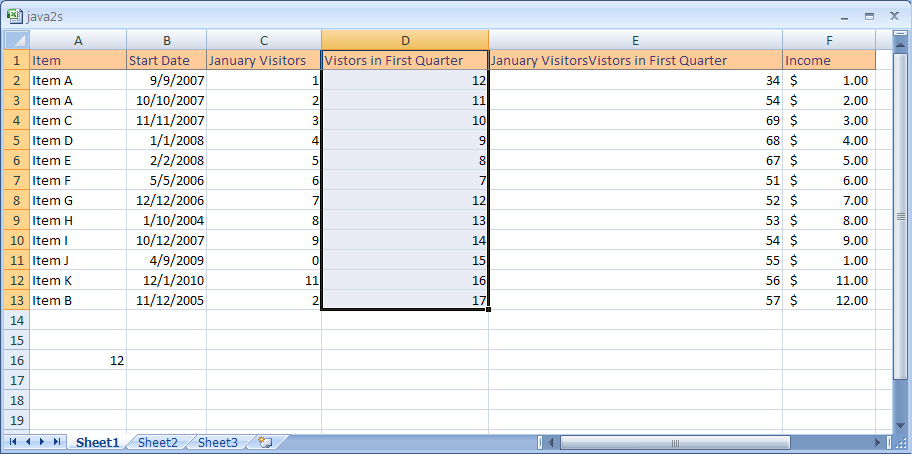
It is the location of a cell or a group of cells that contains the column letter and row number.
Active Cell

It is the cell that had been selected and is the cell in which you are putting information into.
Tuesday, April 7, 2009


Title bar

The bar on the top of the window that has the name of the program/application, the minimize button, maximize/restore button, and the close button.

Scrollbar

In a GUI, if certain graphics doesn't fit into the space on the computer window it allows you to scroll down the window to view the rest of the page.
Restore

The button you click on to make the size of the program on the screen to way it was before you maximized it.


Monday, April 6, 2009


Friday, April 3, 2009
Which OS is more accessible?
The OS that is more accessible for impaired people is the Microsoft Active Accessibility. It helps impaired people by providing programs such as screen readers, screen keyboards, and narrators to tell them what is on the screen.
Wednesday, April 1, 2009
Utility software

It adds more capabilities to the operating system. It is an essential and non-essential to the operating system.
User interface

Anything that can be used by a human using a specific device to change something they want.
Unix

It was one of the first multitasking operating systems that can be installed in any computer that had a C compiler.
Systems software

It refers to the utility programs, including the operating system. It manages computer resources. The software can include loaders, debuggers, and compilers.


Network operating system

An operating systems that has special functions for computers in a local area network.
MS-DOS

An abbreviation for Microsoft Disk Operating System. It was Microsoft's first operating system for personal computers.

Tuesday, March 31, 2009

Monday, March 30, 2009

G.U.I

Stands for Graphical User Interface. It is a program that allows you to use the computer's graphics to make tasks easier to use.
Application Software

Programs that are designed for end users and includes database programs and spreadsheets.

Subscribe to:
Posts (Atom)